
Being part of a community means looking out for one another. The Grant a Wish feature on Supacash makes it easy to provide immediate support to others. Follow these simple steps to help someone in the community today.
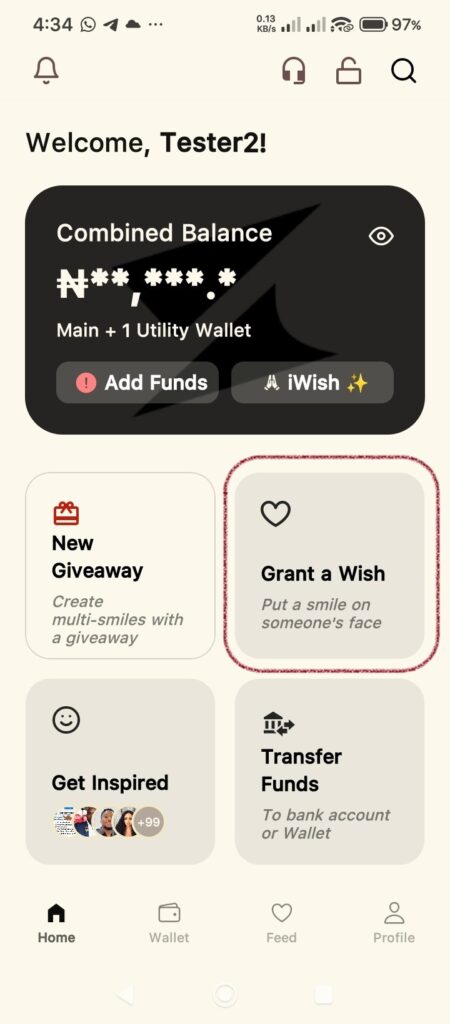
Step 1: Find the Grant a Wish Screen
From your Supacash home dashboard, look for the Grant a Wish card. Tap this card to enter the screen.
Step 2: Browse the Random Wishes Feed
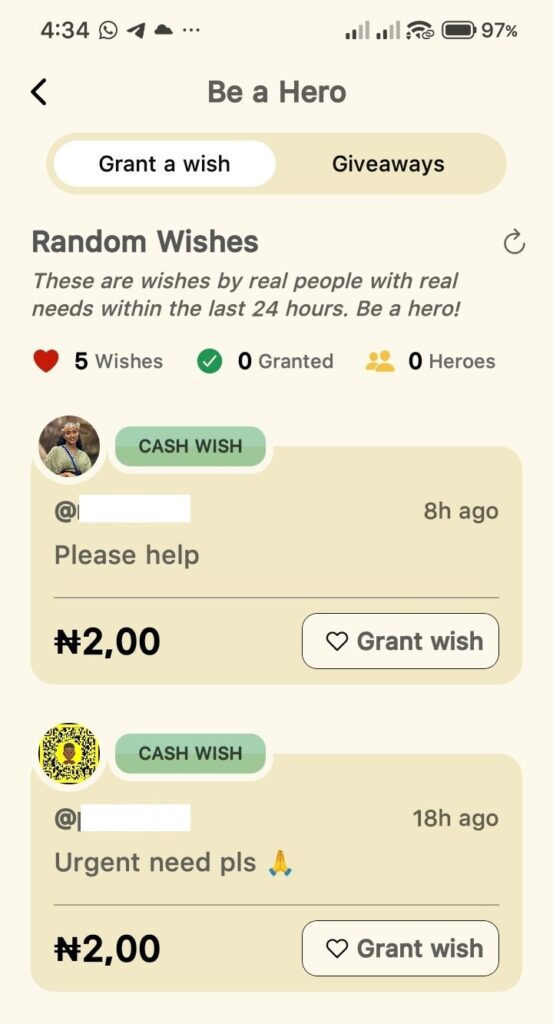
Once inside, you will see the Random Wishes screen.
- This feed displays requests from real people made within the last 24 hours.
- Each request shows the user’s handle, their message and the specific amount they are requesting.
- When you find a request you would like to fulfill, tap the Grant wish button on that specific card.
Step 3: Select Your Payment Method
A summary pop-up will appear confirming the details of the wish.
- Important Note: The app will remind you that the recipient can spend the funds however they choose, regardless of the reason listed in their wish.
- Choose where the funds should be deducted from (Your Main Balance or Hero Wallet).
- Tap Continue to proceed.
Step 4: Add a Personal Touch & Confirm
To finalize your act of kindness:
- Post a comment (Optional): You have the option to leave a supportive message for the recipient.
- Security Check: Enter your 4-digit transaction PIN to authorize the payment.
- Tap Confirm.
Hero Status: Once confirmed, the funds are sent instantly to the recipient. You can track how many lives you’ve impacted by looking at the Granted and Heroes stats at the top of the Be a Hero screen. Thank you for making a difference.