
You can fund your wallet by making a standard bank transfer from any local bank app or USSD code. The money will automatically reflect in your Supacash balance once the transfer is successful.
Step 1: Access the Add Funds Menu
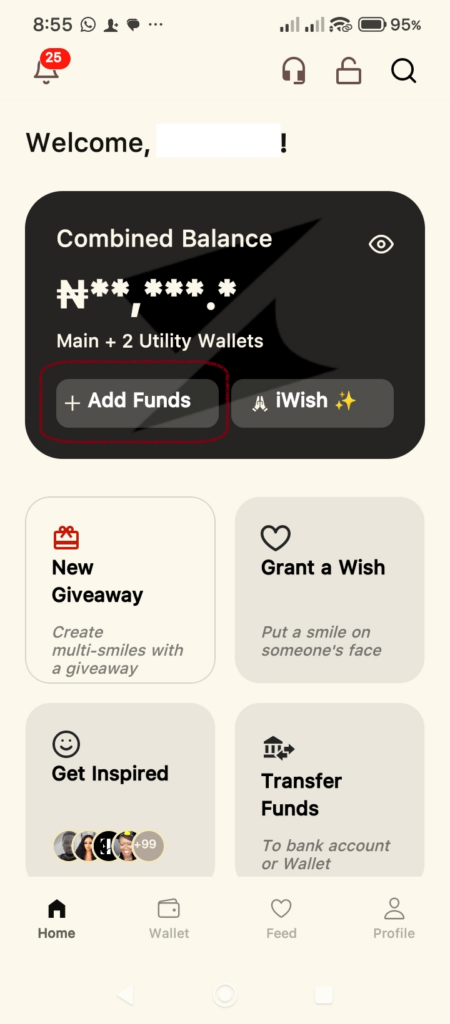
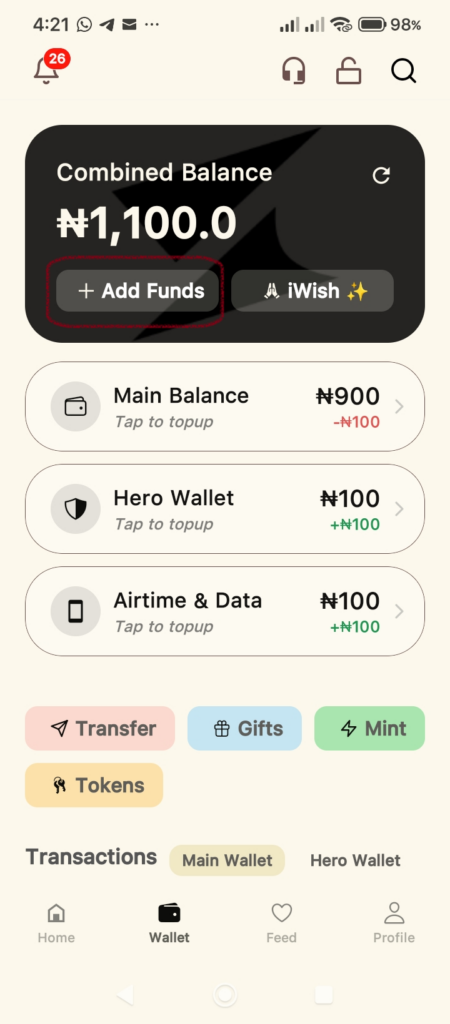
Open your Supacash app. On the Home or Wallet screen, you will see a dark card at the top displaying your Combined Balance.
- Tap the + Add Funds button located on the left side of this card.
Step 2: Retrieve Your Unique Virtual Account Details
Once you tap Add Funds, you will be directed to a screen containing your personalized deposit information. Here you will find your:
- Account Name
- Account Number
- Bank Name
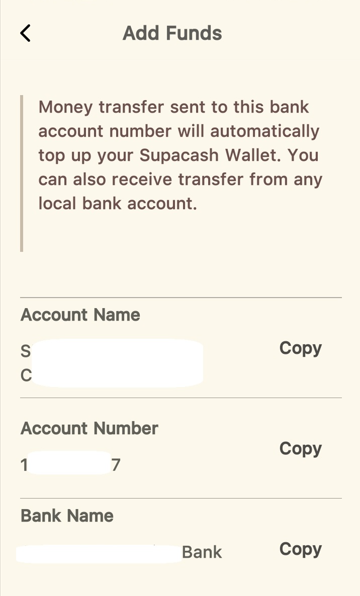
Pro Tip: Use the Copy button next to the Account Number to ensure you have the exact digits without any typos.
Step 3: Perform the Transfer
- Open your regular mobile banking app.
- Select Send Money or Transfer.
- Paste the Account Number you copied from Supacash.
- Select the corresponding Bank Name shown in your Supacash app.
- Enter the amount you wish to deposit and confirm the transaction.
Step 4: Confirm Your Balance
After the transfer is successful, return to the Supacash app.
- You will also receive a credit alert email notification.
- Go to the Wallet tab.
- You should see the updated amount under Main Balance.